Proof at both ends
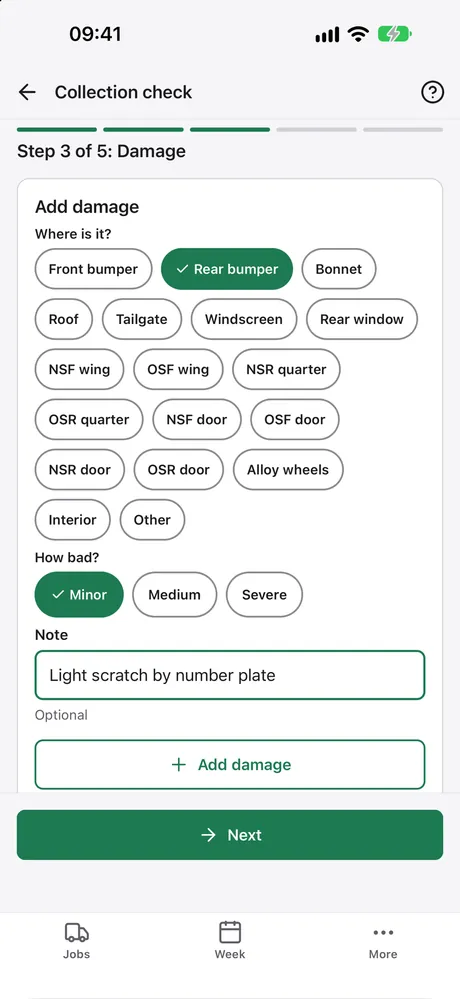
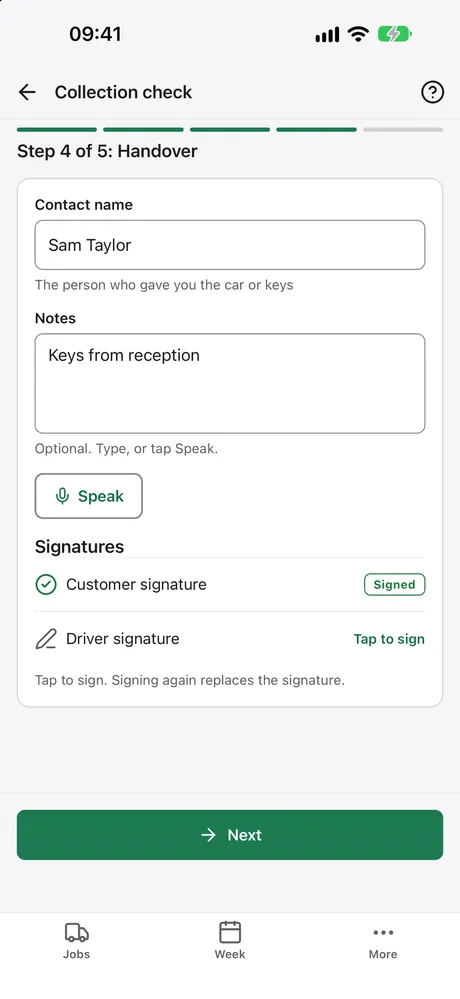
The driver checks the car at collection and at delivery: items, damage by panel with photos, a walk-round video and signatures. The job can't be closed until the delivery check is in.
vAutoMove by vAutoStock
vAutoMove puts each move on your driver's phone, refuses to book the same car twice in a day, and won't close a job until the delivery check is done. Your customer follows it from a link.
For the moves your own drivers do, employed or self-employed. Planner in your web browserdriver app on iPhone and Androidtracking link for customers
Why vAutoMove
Most moves go wrong in the gaps: two drivers sent for one car, or a delivery nobody can prove.
The driver checks the car at collection and at delivery: items, damage by panel with photos, a walk-round video and signatures. The job can't be closed until the delivery check is in.
A real app from the App Store and Google Play, on phones and tablets. Each check goes one step at a time, with big buttons, voice notes and Face ID unlock.
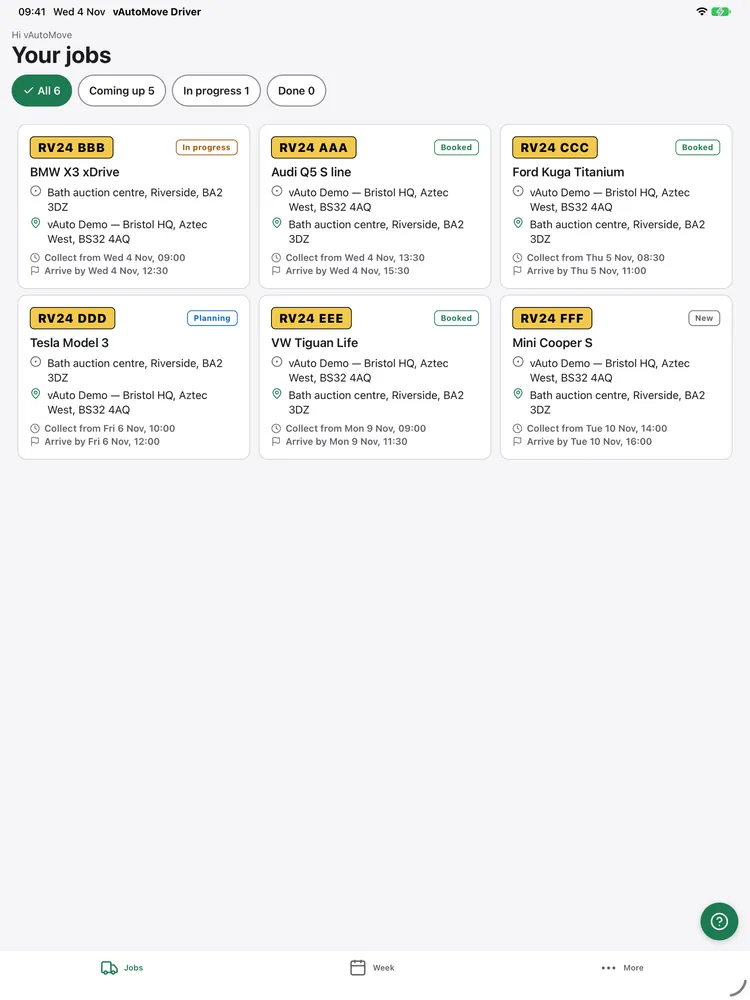
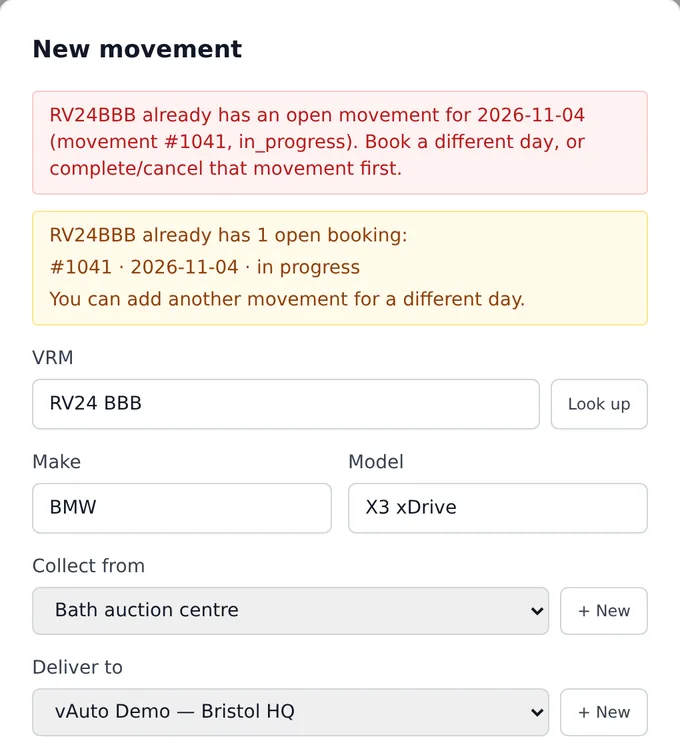
Type the reg and the DVLA fills in the car. vAutoMove won't take a second open move for that car on the same day, and it warns you if this move doesn't start where the last one ended.
Where it fits
Marketplaces and driver networks find you a driver when you need one. vAutoMove is for the moves your own drivers do, whether employed or self-employed. If you use both today, keep doing so.
Your own driversA planner for the desk, an app for each driver and a tracking link for the customer.
Your proofHandover items, every panel, a walk-round video and signatures, kept against the move with the time.
Your systemPart of the vAutoStock you already run: the same logins and the same dealer set-up.
What it does
A planner in the browser for the desk and an app for the driver. Both work from the same record of the move.
Each move has one record: the vehicle, where it's collected and delivered, the time window and the driver. Type the reg and the DVLA fills in the make, colour, fuel and year.
Paper receipts get lost in the van. Drivers photograph each receipt and the app reads the shop and amount for them to check. Shift start and finish are logged too.
No retyping for the file. Print collection and delivery notes, and proof of collection and delivery, straight from the move, with your dealer logo from vAutoStock.
Small marks are easy to miss on a phone screen. AI can check the photos of each damage mark and give the type, how severe it is and how sure it is. The driver's record stands, and your team decides.
"Where's my car?" calls take up the desk. Each move gets its own link. The customer sees the stage it's at and, while the car is on the road, the drive time left.
A plan that ignores traffic is late before it starts. The planner shows each move on a map with the drive time in today's traffic and how busy the roads are.
We'll walk through a real move with you.
How it works
The planner, the driver and the customer each see their part of the same move.
The reg, where to collect it, where to deliver it and the time window. The vehicle details come from the DVLA.
The job appears in their app with your notes, and the customer's tracking link is ready to send.
Mileage, fuel, items handed over, damage with photos, a walk-round video and signatures. Directions open in their own maps app.
The delivery check is done and the customer signs on the driver's phone. The job can't be completed until that check is in.
See a move from booking to signature.
The driver app
Real screens from the App Store version, with demo cars.
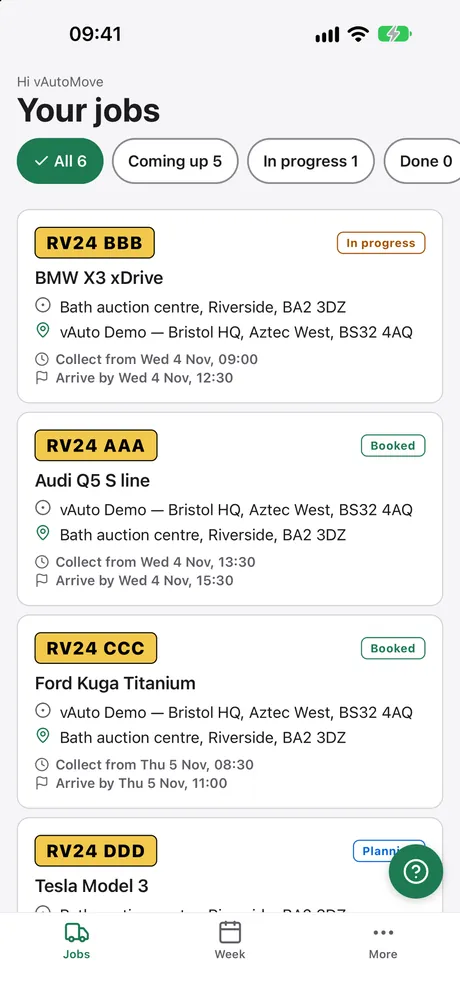
01 Today's jobs, by reg.
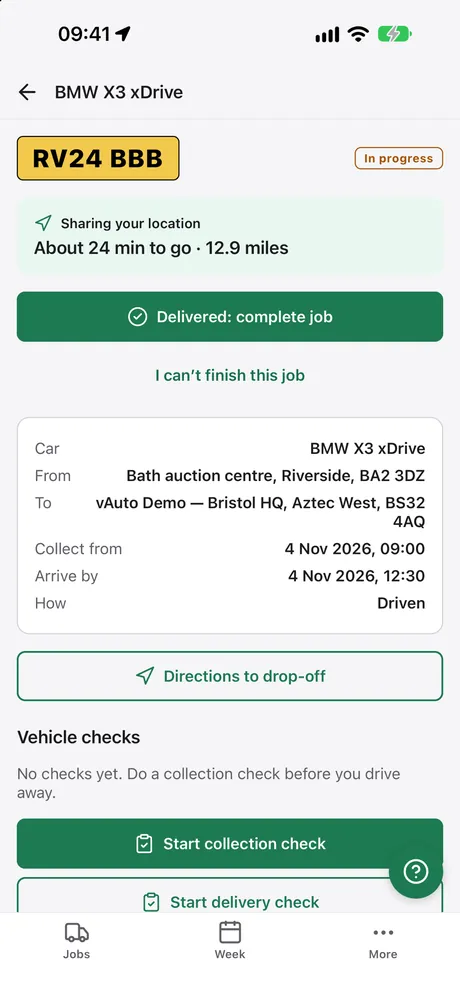
02 One job, with the time to drop-off.
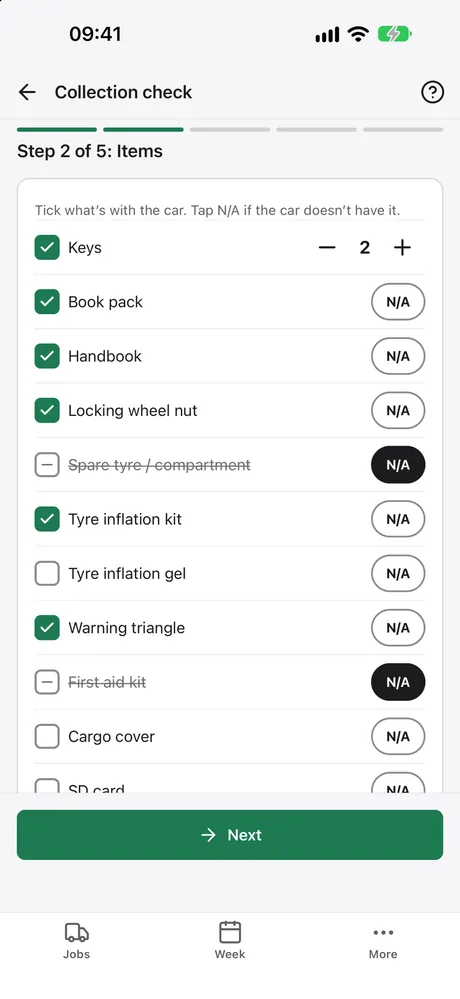
03 Tick what came with the car.
04 Mark damage on the panel.
05 Signed for at handover.
A real app from the App Store and Google Play, not a web page. It shows today's jobs and the week ahead, and walks the driver through each check one step at a time.


Expenses and location updates wait on the phone when there's no signal and send when it's back.
For your customers
Send the customer their tracking link. There's no app to download and no account to make.
Works with
vAutoMove runs on your vAutoStock set-up, so your team signs in with the logins they already have.
Your team signs in with their vAutoStock login. We turn vAutoMove on for your dealership, and your planner creates drivers' logins.
Vehicle details from the reg when you book.
Drive times and congestion for each move whose sites have a postcode. Postcodes find each site's location for you.
Directions open in Google Maps or Apple Maps on the driver's phone.
Compare
Same drivers, same cars. The difference is what you can prove afterwards.
| What you need | vAutoMove | Spreadsheet and group chat |
|---|---|---|
| Every move and its status in one list | Yes | Spread across files and chats |
| Same car booked twice on one day | Blocked when you book | Found out on the day |
| Job closed with no delivery check | Not possible | Easily missed |
| Customer asks where the car is | You send a link | Someone rings the driver |
| Drivers' receipts and hours | In the app, with photos | Paper and texts |
Made for driversA store app with Face ID unlock, step-by-step checks and voice notes.
Evidence you can findEvery check is kept against the move, with its time.
Part of vAutoStockIt uses the same logins and the same dealer set-up.
Part of vAutoStock
vAutoMove uses your vAutoStock logins. The other products share the same record.
Prep across all your sites, on your team's phones.
vautostock.appKeys work from vAutoStock into Keyloop or Gemini, from a PC at your dealership.
vautobots.comQuote, order, deliver and match the invoice, across several dealers.
vautoparts.co.ukUpdates service customers by email in your name (texts need an SMS account), with call lists for advisors.
vautoworkshop.comThe vAutoStock app on its own, for independent and growing dealers.
vautostock-lite.appA UK marketplace for vAutoStock dealers' cars. No listing fees.
vautocars.co.ukQuestions
Anything else? Send us a message or call +44 20 8050 5522.
Software for planning and recording vehicle moves at UK dealerships. Planners book moves in a web browser. Drivers do collection and delivery checks in an iPhone or Android app. Customers follow the move from a tracking link.
Three people. The planner books and assigns moves at a desk. The driver works the job on their phone. The customer opens a link to see where things are. Only the planner and the driver need a login.
Mileage and fuel, and which items were handed over: keys, locking wheel nut, charging cables, warning triangle and more. They also mark damage on each panel with photos, take a walk-round video of up to 90 seconds, and collect signatures from the driver and the customer. They can speak notes instead of typing.
When a damage mark has photos, they can be sent for an automatic check. It returns the type of damage, how severe it looks and how sure it is, and sits next to the driver's own mark. It's a second look: your team decides what happens next.
Every move has its own private link. The customer enters the last six characters of their reg to open it. They then see the stage the move is at and, while the car is on the road, the drive time left in live traffic. Their full reg and your site addresses are never shown.
Yes. Book those moves there as you do now. vAutoMove is for the moves your own drivers do, and keeps the proof of each one.
Search for vAutoMove Driver on the App Store or Google Play. Your planner adds each driver in vAutoMove, which creates their login to pass on.
See it on a real move
Bring a move you made last week. We'll show you how it would look in vAutoMove, from the booking to the delivery signature.
Or call +44 20 8050 5522 · Monday to Friday, 9am to 5pm, UK time